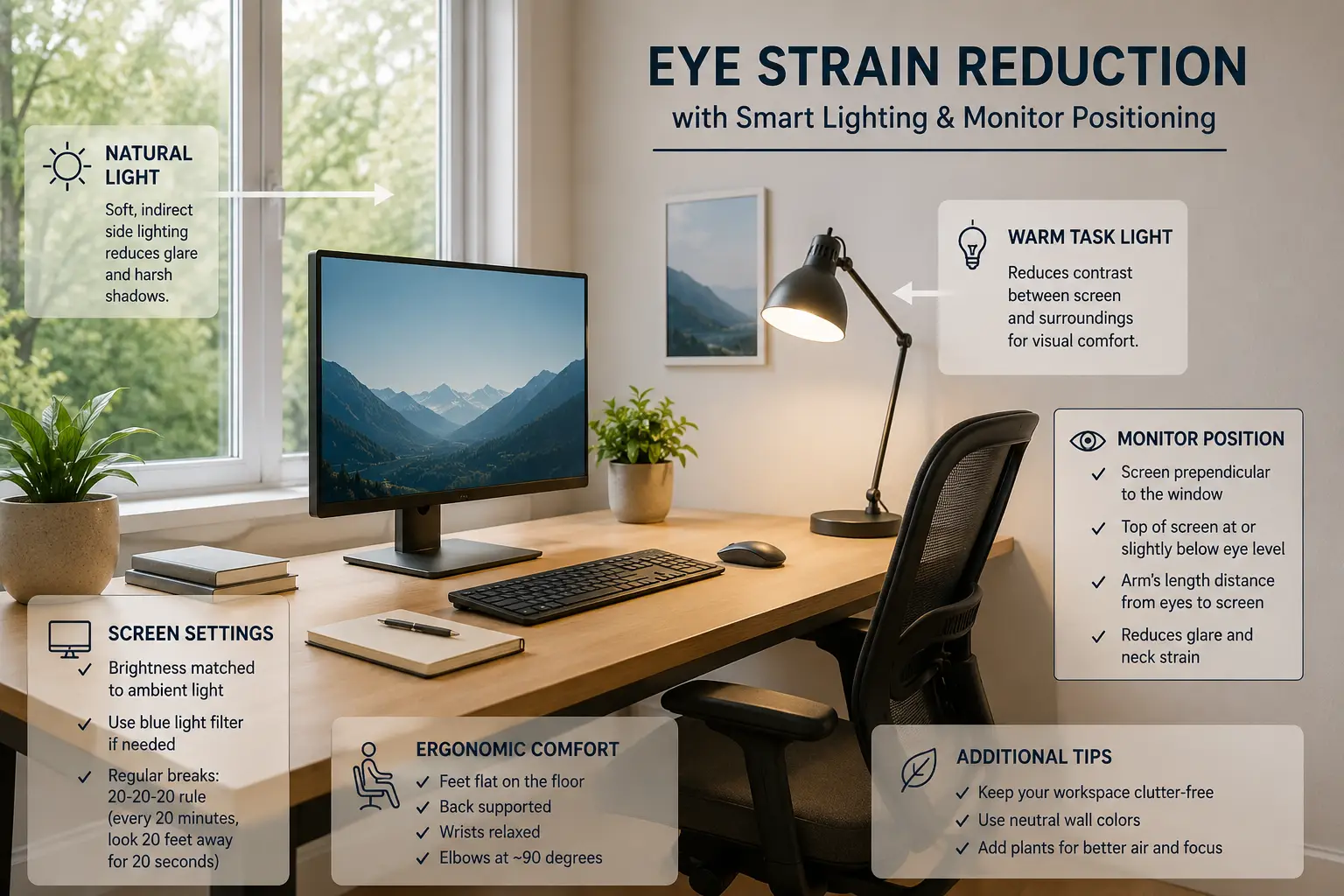
Home office lighting setup is an important topic that many people search for. In this comprehensive guide, we will explore everything you need to know about home office lighting setup, backed by expert insights and practical strategies.
A well-designed home office lighting setup is essential for reducing digital eye strain, improving focus, and maintaining long-term visual comfort during remote work. This guide explains how to optimize lighting, monitor placement, and brightness balance for a healthier workspace.
Balanced lighting reduces glare and improves long-term eye comfort during computer work.
Why Proper Lighting Matters for Eye Strain
Poor lighting conditions force your eyes to constantly adjust between bright and dark areas, leading to fatigue, dryness, and reduced productivity during long working hours.
Common Causes of Eye Fatigue
Too bright or too dim screens create visual stress.
Direct sunlight increases reflections and reduces clarity.
Creates uneven contrast across the workspace.
Effects of Poor Lighting
Continuous exposure to poor lighting conditions may cause headaches, blurred vision, and reduced concentration.
- Faster eye fatigue during screen work
- Lower productivity and focus
- Increased discomfort during long sessions
- Higher risk of long-term visual strain
Best Lighting Setup Practices
- Place monitor perpendicular to windows.
- Use soft ambient lighting instead of harsh direct light.
- Match screen brightness with room brightness.
- Use 3000K-5000K color temperature lighting.
- Add bias lighting behind your monitor.
Recommended Lighting Balance
A balanced combination of ambient light and controlled screen brightness creates a comfortable and productive workspace for long working hours.
Slightly dim environments with properly adjusted monitors are often more comfortable than overly bright office lighting.
Final Thoughts
A proper lighting setup significantly improves eye comfort, productivity, and overall work experience for remote professionals.
Explore More Scenes
Related Articles
Understanding Digital Eye Strain
Digital eye strain, also known as computer vision syndrome, affects up to 90% of people who spend more than 2 hours per day on digital devices. Symptoms include dry eyes, headaches, blurred vision, neck and shoulder pain, and difficulty focusing.
The root cause isn’t just screen time鈥攊t’s often poor lighting conditions that force your eyes to work harder. When ambient lighting is too dim or too bright compared to your screen, your pupils constantly adjust, leading to fatigue.
Common Symptoms of Eye Strain
- Visual Symptoms: Blurred vision, double vision, difficulty focusing
- Physical Symptoms: Headaches, neck pain, shoulder tension
- Ocular Symptoms: Dry eyes, redness, burning sensation, excessive tearing
- Performance Symptoms: Decreased productivity, increased errors, difficulty concentrating
The Science of Proper Lighting
Understanding how light affects your eyes helps you make informed decisions about your workspace setup.
Color Temperature Explained
Color temperature is measured in Kelvin (K) and affects both mood and eye comfort:
- 2700K-3000K (Warm White): Cozy, relaxing鈥攂est for evening work or creative tasks
- 3500K-4100K (Neutral White): Balanced, natural鈥攊deal for general office work
- 5000K-6500K (Cool White/Daylight): Energizing, focused鈥攂est for detailed work and morning productivity
For most home office workers, a color temperature of 4000K-5000K provides the best balance of comfort and alertness.
Understanding Lux and Foot-Candles
Light intensity is measured in lux (metric) or foot-candles (imperial):
- General Office Work: 300-500 lux (30-50 foot-candles)
- Reading and Writing: 500-750 lux (50-75 foot-candles)
- Detailed Work (drawing, sewing): 750-1000 lux (75-100 foot-candles)
- Computer Work: 200-300 lux ambient + task lighting as needed
Advanced Lighting Setup Strategies
1. The Three-Layer Lighting Approach
Professional lighting designers recommend three layers of light for optimal comfort:
- Ambient Lighting (Layer 1): Overall room illumination from ceiling fixtures or natural light. This should be soft and even, without harsh shadows.
- Task Lighting (Layer 2): Focused light for specific activities like reading documents or writing. Position desk lamps to illuminate your work surface without creating glare on your screen.
- Accent Lighting (Layer 3): Decorative or mood lighting that adds depth and reduces contrast between your screen and surroundings. LED strips behind your monitor or a small lamp in the corner work well.
2. Eliminating Screen Glare
Glare is one of the leading causes of eye strain. Here’s how to eliminate it:
- Position Your Monitor: Place your screen perpendicular to windows, not facing or backing them
- Use Window Treatments: Blinds, curtains, or anti-glare film to control natural light
- Adjust Screen Brightness: Match your screen brightness to ambient light levels
- Anti-Glare Screen Protectors: Matte filters reduce reflections without affecting image quality
- Monitor Hood: For critical work, a monitor hood blocks overhead and side light
3. Bias Lighting for Monitor Setups
Bias lighting involves placing a light source behind your monitor to reduce eye strain:
- How It Works: A soft light behind the screen reduces the contrast between the bright display and dark surroundings
- Recommended: LED strip lights with 6500K color temperature (matches daylight)
- Placement: Attach to the back edge of your monitor, facing the wall
- Benefits: Reduces eye fatigue by up to 40%, improves perceived contrast
Best Lighting Products for Home Offices
Desk Lamps
- BenQ ScreenBar: Monitor-mounted light bar, no screen glare, USB-powered
- TaoTronics LED Desk Lamp: Adjustable color temperature and brightness, memory function
- Philips Hue Go: Smart portable lamp, app-controlled, millions of colors
Ambient Lighting
- LED Ceiling Panels: Even, flicker-free illumination, dimmable
- Govee LED Strip Lights: Affordable bias lighting, app-controlled
- LIFX Smart Bulbs: WiFi-enabled, no hub required, excellent color accuracy
Natural Light Optimization
- Light Therapy Lamps: 10,000 lux lamps for winter months or windowless rooms
- Daylight Bulbs: Replace standard bulbs with 5000K-6500K daylight equivalents
- Window Light Shelves: Reflect natural light deeper into your workspace
Daily Habits to Protect Your Eyes
The 20-20-20 Rule
Every 20 minutes, look at something 20 feet away for at least 20 seconds. This simple practice relaxes your focusing muscles and reduces eye fatigue.
Proper Blinking
When staring at screens, we blink 66% less frequently, leading to dry eyes. Practice conscious blinking:
- Set reminders to blink fully and frequently
- Use artificial tears if eyes feel dry
- Avoid air vents blowing directly on your face
Screen Position and Distance
- Distance: Keep your monitor 20-26 inches (50-66 cm) from your eyes
- Height: Top of screen at or slightly below eye level
- Angle: Tilt screen back 10-20 degrees to reduce glare
Long-Term Eye Health for Remote Workers
Protecting your eyes isn’t just about comfort鈥攊t’s about long-term health. Chronic eye strain can lead to:
- Persistent headaches and migraines
- Chronic dry eye syndrome
- Premature presbyopia (difficulty focusing on close objects)
- Increased risk of myopia progression
Investing in proper lighting and developing good visual habits now will pay dividends for decades to come. Your eyes are irreplaceable鈥攖reat them with the care they deserve.